
The starting point
Where it started.
Rota is an app for small domestic cleaning companies in the UK: the kind with a handful of cleaners and a few hundred regular clients. Most of the work is weekly and fortnightly cleans of the same homes.
On paper that is predictable. In practice the week is full of exceptions. Someone is off sick, a client moves a visit, a key is missing, a clean is marked done and the client says a room was missed.
In most companies of this size, all of that runs through WhatsApp, a calendar and the owner’s memory.
What was getting in the way
- The schedule lived in WhatsApp, paper and spreadsheets, so every change was repeated by hand
- A cover cleaner often arrived without the key details or the instructions for the home
- The owner could not see which visits had started, finished or hit a problem
- Finished work was not always turned into a payment
The approach
How we thought about it.
Rota is built around the life of one clean: planned, assigned, understood, completed, checked and paid. Every screen is one step on that path.
It started as a web app, so a business could open a link and try it without installing anything. Working through that version made one thing clear: the schedule is the easy part. The value is in the exceptions and in proof that the work was done.
So the rebuild put the people in the homes first. It became an iPhone app with a view for each role and a way to keep working with no signal, and the owner’s home screen became a list of what needs attention.
Inside the build
What we built, and why.
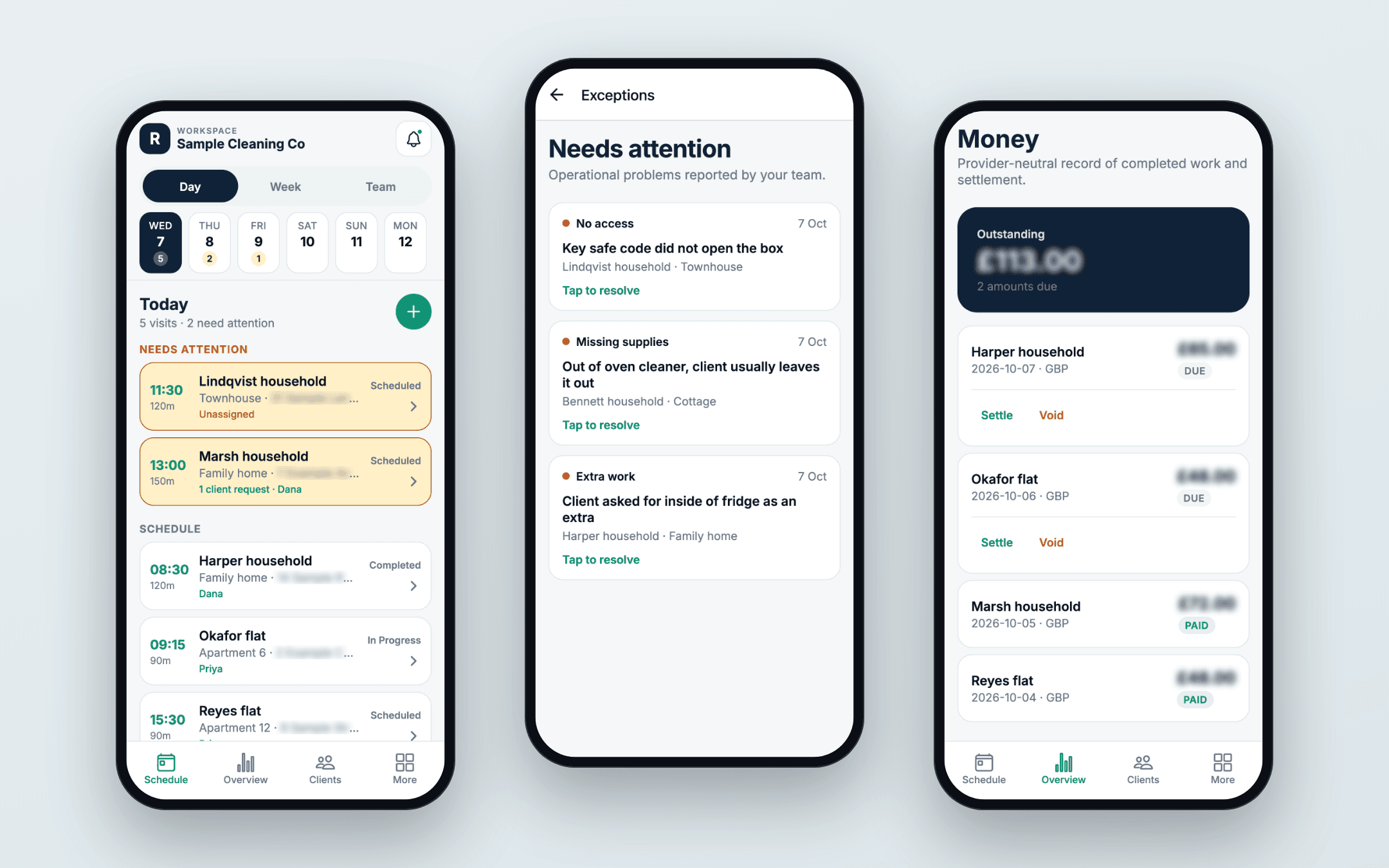
The owner’s schedule
The home screen answers one question: what needs attention today? Visits with no cleaner, a client request or a problem sit at the top. Routine work sits below.
Properties and service plans
A client can have more than one property. Each property holds its own access notes and checklist, and a service plan sets how often the clean happens. Details are entered once and follow every visit.
The cleaner’s view
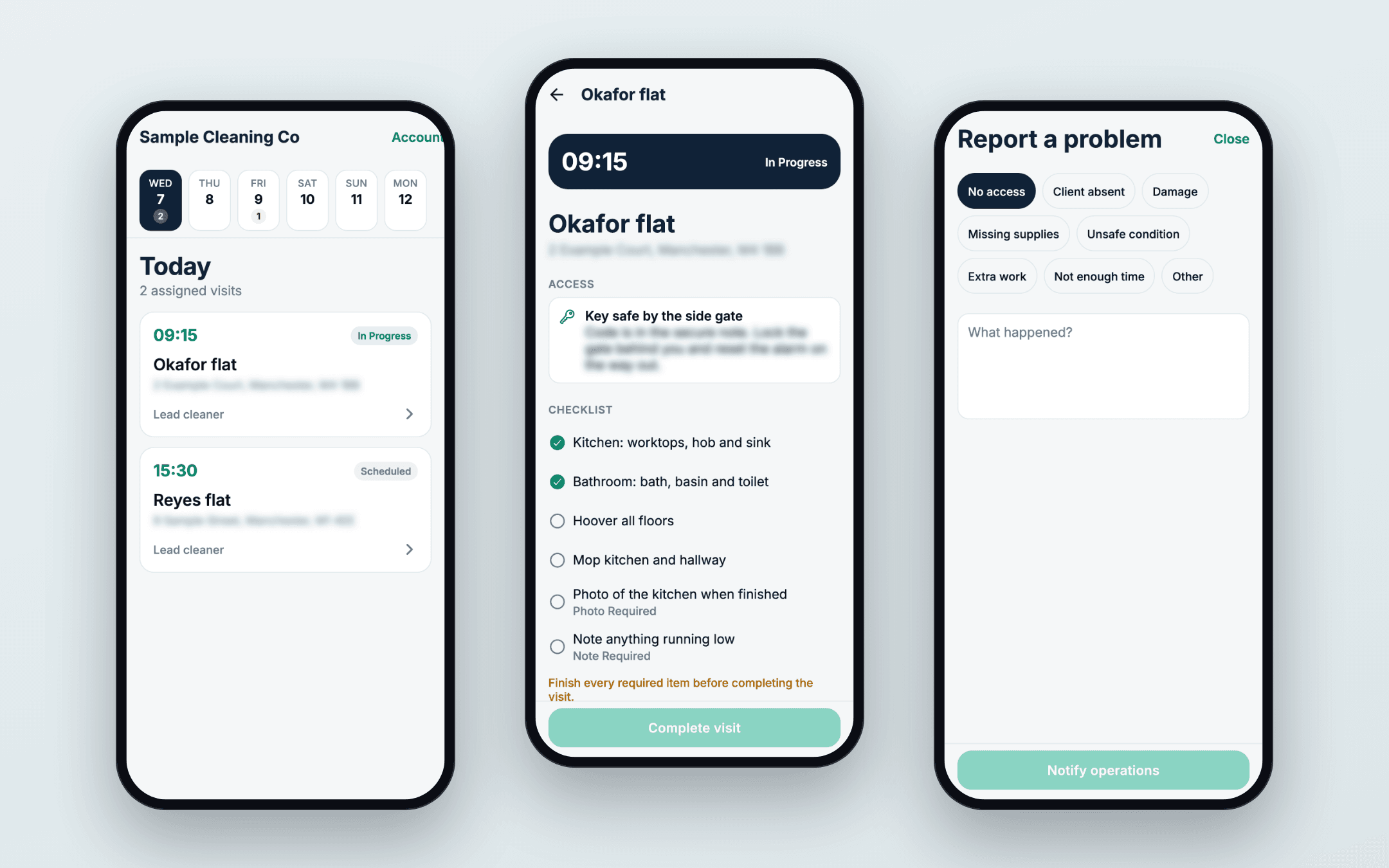
A cleaner sees only their own visits. Each one shows the address, how to get in and the checklist. They mark that they have arrived, start the visit and complete it. Required items have to be done first.
Proof of the work
A checklist item can ask for a photo or a note. The owner decides which ones do, so a standard clean stays quick and a deep clean leaves a record.
Problems and cover
Cleaners report a problem from the visit itself. The owner sees every open problem in one list and records how it was resolved. A cleaner’s absence can be recorded so their visits can be covered.
Money and clients
Each completed, chargeable visit creates one amount due. The owner marks it settled by cash, bank transfer or card. Clients have their own area for bookings, messages and invoices.
How it works
From start to finish.
One regular clean, from set-up to payment.
- Set up the cleanThe owner adds a client, their property and a service plan: how often, what time, how long and the price.
- Visits appearThe plan creates the visits. Any visit with no cleaner assigned is flagged.
- The cleaner’s dayEach cleaner opens the app to an ordered list of where to be and when.
- At the homeThey see how to get in and what to do, tick off the checklist and add a photo where one is required.
- Something goes wrongA problem such as no access or missing supplies is reported in a couple of taps and lands with the owner.
- Done and dueCompleting the visit updates the owner’s schedule and records the amount due.
Decisions that shaped it
The choices behind it.
Problems first
A normal week should run quietly. The app puts the exceptions at the top, so the owner looks at five visits that need a decision and not fifty that do not.
It has to work with no signal
Cleaners work in hallways, basements and new builds. Visit actions, checklist ticks and photos are saved on the phone and sent in order when the connection returns.
One app, three roles
Owners, cleaners and clients sign in to the same app and each sees only their part. A cleaner never sees the money, and a client never sees another home.
Access details are treated as sensitive
Key safe codes and alarm notes are shown only to people who need them for that visit, and are kept in the phone’s secure storage, apart from the rest of the saved data.
Rebuilt step by step
The first version ran in the browser, the quickest way to test the idea. The move to an iPhone app was done one workflow at a time, adding to the existing data instead of replacing it.
Where it stands
Where it stands.
This page describes what was built and why. We do not publish figures for this project, and results depend on the business, its offer and its market.
The same shape suits any business that sends people out to do repeat work: a plan that creates the visits, a simple view for the person doing the job, and an owner’s screen that shows the exceptions first.