
The starting point
Where it started.
Prayd is an iPhone app for Muslims who want help praying on time. Muslims pray five times a day, and each prayer has its own window.
Most prayer apps work as reminders. A notification arrives, and the apps that were holding your attention are still one tap away. The idea behind Prayd is to change what the phone does. While a prayer is owed, the apps you chose stay locked.
That is a serious thing for an app to do. It has to know the right prayer times for where you are, lock and unlock at the right moments, and never trap someone who has done nothing wrong.
What was getting in the way
- A reminder is easy to swipe away, so it changes very little
- A lock that is too strict gets the app deleted, and one that is too easy does nothing
- A wrong lock on someone’s phone is far worse than a missed one
The approach
How we thought about it.
The first decision was to treat a missed prayer as something owed, not as a moment that passes. That one rule drives the whole product: what locks, when it unlocks and what the lock screen says.
The second was safety. Every unclear case ends with the phone open. On top of that sit the ways out: breaks, a fallback for praying without a mat, and pauses for people who are exempt.
The third was Apple. Locking apps on an iPhone depends on a Screen Time permission that Apple grants app by app after a review. That request went in first, and the rest of the app was built and tested while it was being reviewed.
Inside the build
What we built, and why.
A lock tied to the prayer, not the clock
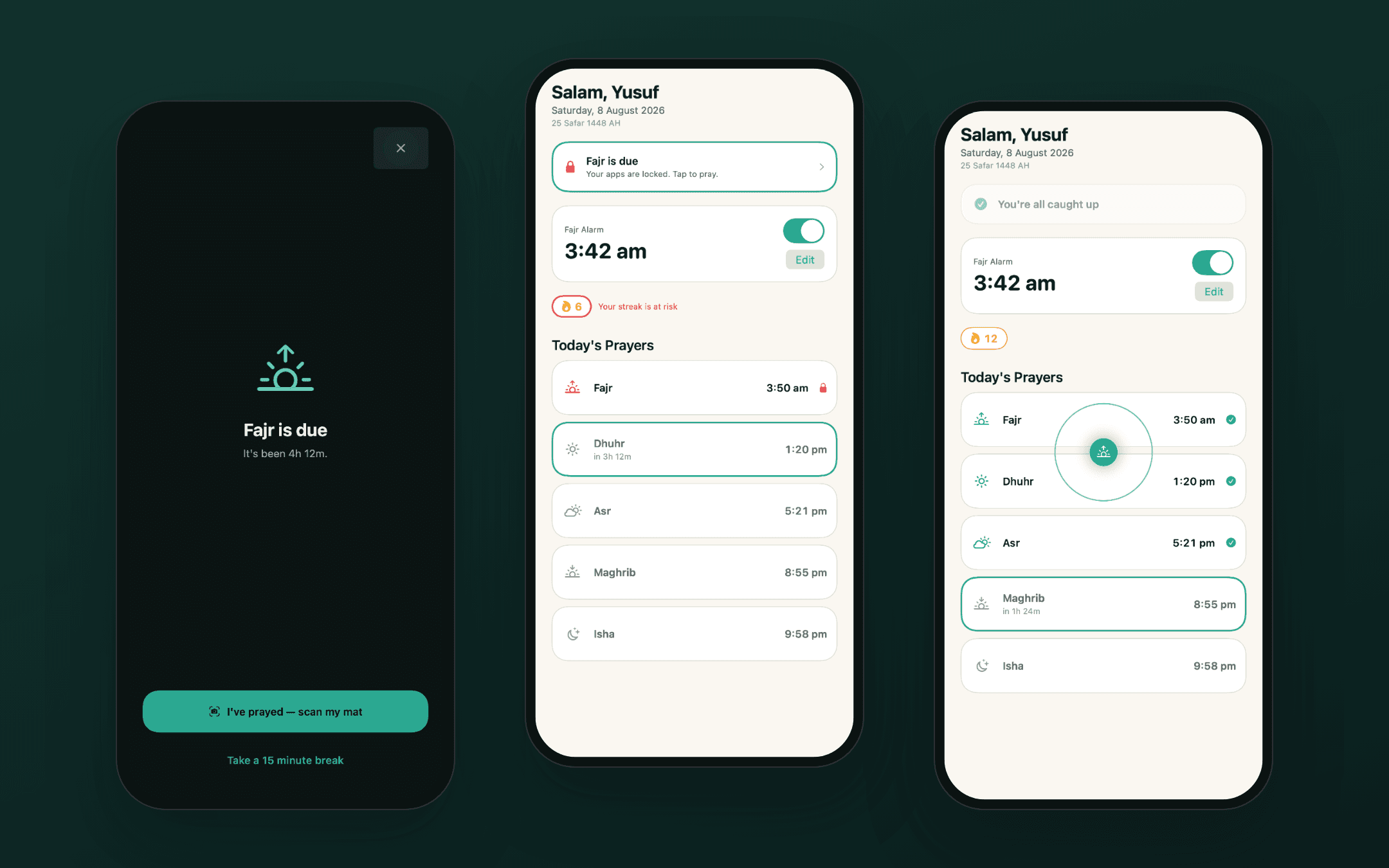
Each prayer that has started and has not been prayed counts as owed. While anything is owed, the chosen apps stay locked. Miss Fajr and the phone is still locked at ten in the morning.
The mat scan
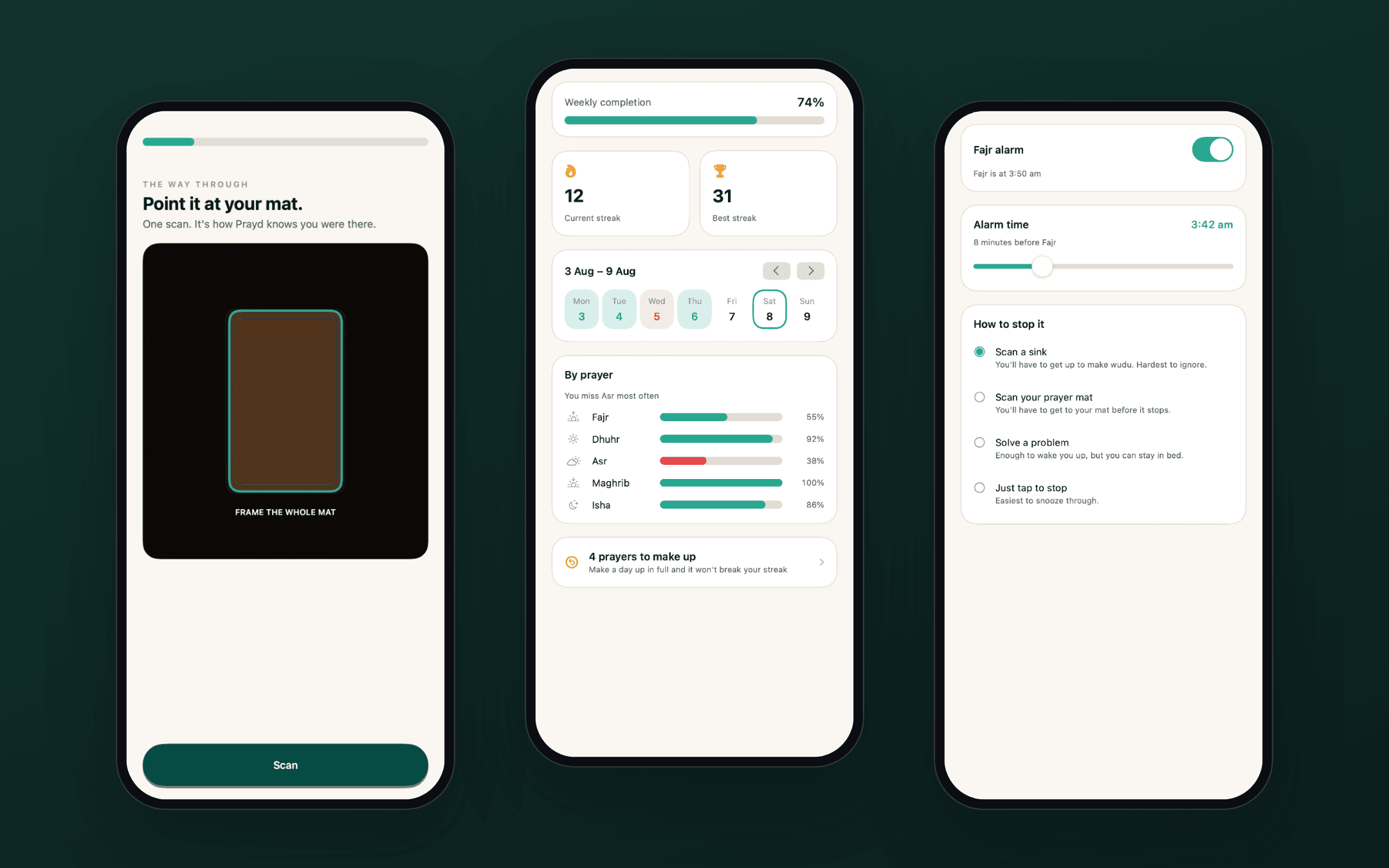
The user registers their own prayer mat once. To unlock, the camera has to see that mat, framed whole, for a steady few seconds. The matching thresholds were set by testing on real photos of real mats.
Ways out, on purpose
Short breaks, an "I prayed without a mat" option, and pauses for travel, illness and menstruation. A paused day does not break a streak and is never shown as a missed one.
Prayer times without a server
Times are worked out on the phone, so the app works offline and a user’s location never leaves the device. There are no accounts and no prayer data on a server.
The Fajr alarm
An alarm for the dawn prayer that keeps going until the user completes a task. The strictest one is scanning a sink, so they are already up and ready to wash.
Paying for it
A free download with a trial and App Store subscriptions. The price shown always comes from the App Store, so it is right in every country.
How it works
From start to finish.
For one prayer, it goes like this.
- Choose the appsDuring set-up the user picks which apps should lock and gives Screen Time permission.
- Prayer time arrivesThe phone works out the time itself and sends a notification, with a short grace period before anything locks.
- The apps lockOpening a locked app shows a screen that names the prayer that is due and offers one way forward.
- Pray, then scanAfter praying, the user points the camera at their prayer mat and holds still for a few seconds.
- The lock liftsThe apps open again, the prayer is logged and the streak moves on.
- A new dayAnything still unprayed at the next Fajr moves to a make-up list and the lock clears.
Decisions that shaped it
The choices behind it.
When in doubt, do not lock
If the prayer times look out of date, the saved state does not add up or the subscription has lapsed, the app leaves the phone open. Letting someone through by mistake is a bug. Locking them out by mistake is much worse.
The lock always ends
Everything owed is closed out at the next Fajr and moved to a make-up list. Nothing carries over, so the phone is never locked for more than a day.
The rules live apart from the screens
The prayer and locking rules are written as plain logic with no interface attached. They can be tested from the command line and reused by the small background parts that iOS allows very little memory.
Every state, one click away
A desktop gallery shows every screen in every state, light and dark. States that are hard to reach on a real phone, like a lock in the middle of the night, can be checked in seconds.
Only true claims
No invented user numbers, ratings or badges anywhere in the app or its App Store page. The social proof screen ships empty until there is something real to put on it.
Where it stands
Where it stands.
Prayd is live on the App Store. This page describes what was built and why. We do not publish figures for this project, and results depend on the product, its offer and its market.
The same care applies to any app that does something on a person’s behalf: decide what happens when the app is unsure, and build the safe answer in from the start.